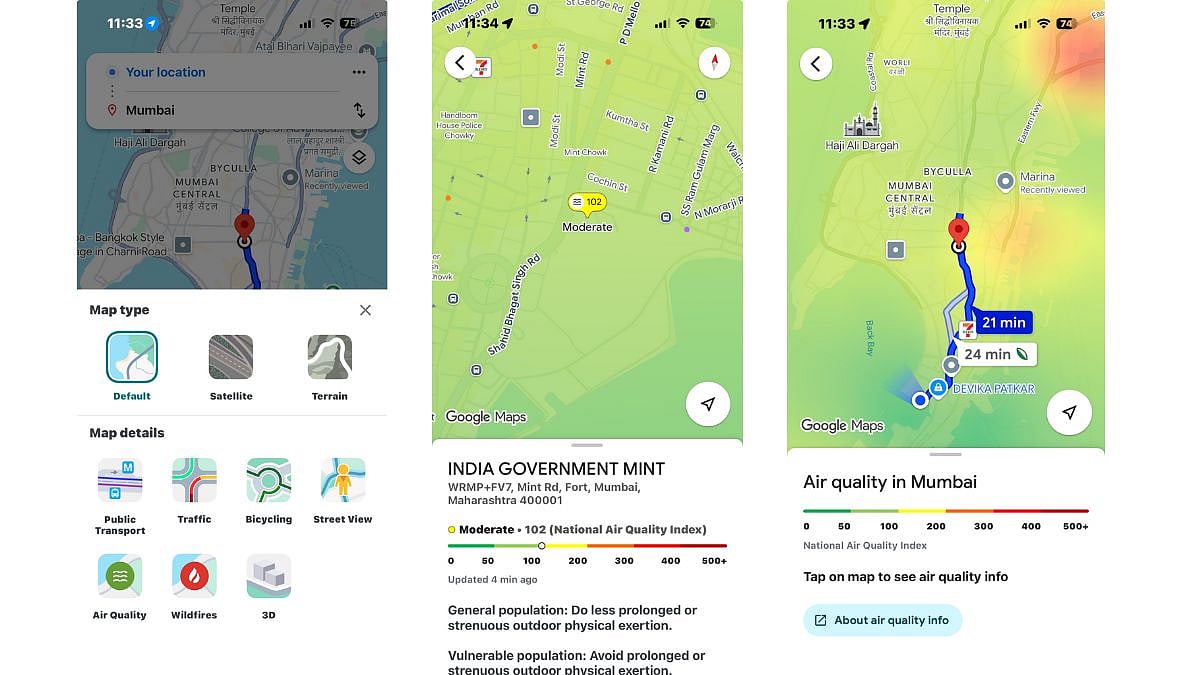
Google Maps can be used to check real-time air quality across India. With the country grappling with poor air quality issues, this feature is extremely helpful when travelling to a new city or a new area. The app gives you real-time AQI updates based on your location, offers preventive measures that you can take - like wearing a mask.
Google Maps provides colour-coded updates to help users make informed decisions about outdoor activities amid the winter smog season. In areas of very poor air quality, authorities have urged citizens to limit time outdoors, use masks and rely on apps for updates. Schools in Delhi were also closed due to air quality issues. Google Maps' integrates hourly AQI data, sourced from reliable environmental agencies, to provide accurate AQI update in-app.
Step-by-step guide to checking AQI on Google Maps
Accessing air quality information on Google Maps is straightforward and available on both mobile devices and desktops. Follow these steps for quick checks:
1. Check if Google Maps app is updated to the latest version on Google Play Store and App Store.
2. Open the app and search for the are you are heading towards. Once the location shows up, simply zoom in on the location.
3. Tap the layers icon, represented by a stack of squares, located below the search bar on the right-hand side.
4. From the menu that appears, select the 'Air Quality' option to activate the AQI layer on the map.
5. Tap on any shaded area or location pin to view detailed data, including the numerical AQI score, primary pollutants like PM2.5 and PM10, and health recommendations such as avoiding strenuous exercise.
Google Maps uses a familiar colour code - green for good (0-50), yellow for satisfactory (51-100), orange for moderate (101-200), red for poor (201-300), purple for very poor (301-400) and maroon for severe (401-500).

