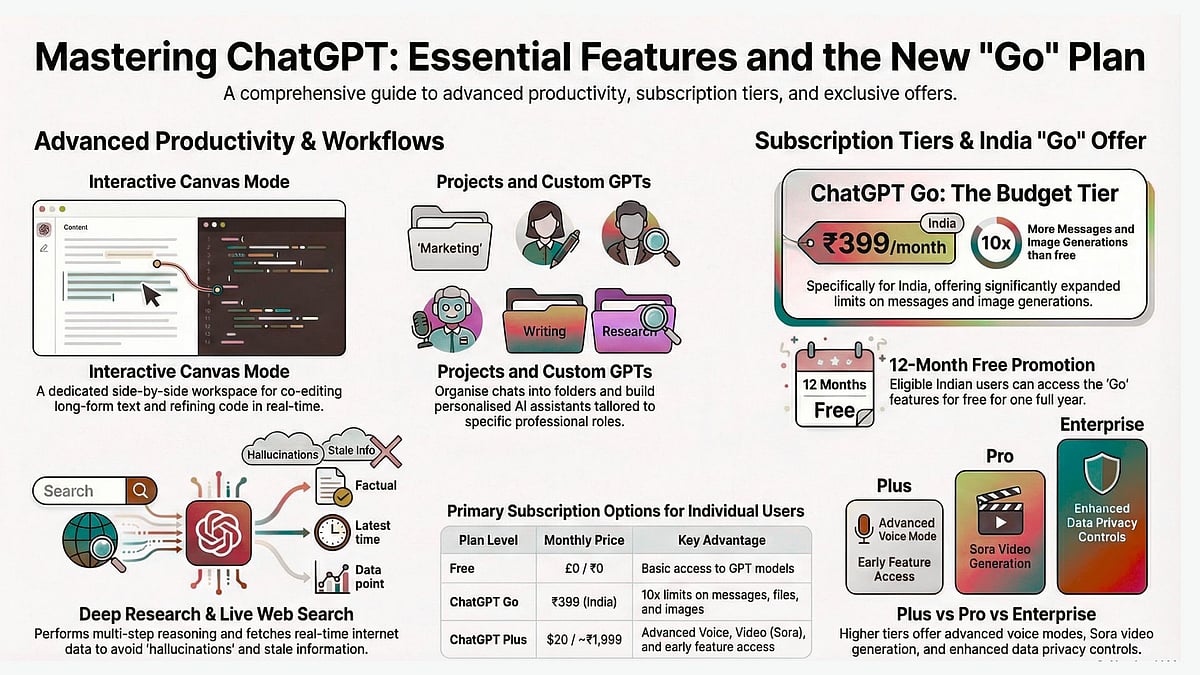
ChatGPT has evolved from a simple chatbot into a comprehensive AI assistant that can write code, analyse data, generate images, browse the web, and even take actions on your behalf. Whether you're a student researching assignments, a professional streamlining workflows, or a creator exploring new possibilities, understanding how to use ChatGPT effectively can transform how you work. This article breaks down every major feature so you can extract maximum value from the platform, regardless of your industry or technical background.
What Is ChatGPT?
ChatGPT is an AI chatbot developed by OpenAI that generates human-like text responses through natural language processing. It functions as a versatile creative assistant capable of engaging in fluid conversation, writing and debugging code, translating languages, summarising documents, and answering complex questions. The system is designed to feel conversational and approachable rather than robotic, making it accessible to users without technical expertise.
At its core, ChatGPT processes your prompts through large language models trained on vast amounts of text data. When you type a question or request, the system analyses your input, considers context from the conversation, and generates a response word by word. The latest versions can access the internet for real-time information, interpret images you share, and remember details about you across sessions to provide increasingly personalised assistance.

Core Capabilities That Work Across Every Industry
1. Conversational AI
The foundation of ChatGPT is natural conversation. You can brainstorm ideas by talking through problems aloud, practise difficult conversations like salary negotiations or job interviews, role-play scenarios for training purposes, or simply explore topics through dialogue. The system maintains context throughout your conversation, so you can refer back to earlier points without repeating yourself.
2. Writing and Content Creation
ChatGPT excels at generating written content across formats. It can draft emails that match your professional tone, write blog posts and articles from brief outlines, create scripts for videos or presentations, and generate marketing copy for campaigns. The system adapts its writing style based on your instructions, so you can request anything from formal business documents to casual social media posts.
3. Coding and Data Analysis
Beyond text, ChatGPT can write, debug, and explain code in multiple programming languages including Python, JavaScript, SQL, and more. You can upload spreadsheets and PDFs for analysis, ask it to identify patterns in your data, or have it build interactive dashboards. A feature called Canvas allows you to edit code side-by-side with the AI, making collaborative programming more intuitive.

4. Web Search and Real-Time Information
While ChatGPT has a knowledge cutoff date, it can browse the internet to fetch current information when needed. This means answers can include the latest software versions, breaking news, current stock prices, or recent research findings. The system automatically searches when it detects your question requires up-to-date information, though you can also explicitly ask it to look something up. A journalist researching a story or an investor tracking market movements can get real-time data without leaving the conversation.
5. Image Generation and Vision
ChatGPT can both create and interpret images. Using integrated image generation capabilities, you can describe a visual concept and receive AI-generated artwork, diagrams, or illustrations. The vision feature works in reverse, allowing you to share images through your camera or uploads for the AI to analyse. It can identify objects, plants, food ingredients, technical diagrams, handwritten notes, or screenshots. A chef could photograph ingredients in their refrigerator and ask for recipe suggestions, while an engineer might share a circuit diagram for troubleshooting.
6. Voice Mode
ChatGPT supports two-way voice conversations, allowing you to speak naturally rather than type. This transforms the tool into a hands-free assistant useful while driving, cooking, or multitasking. Advanced voice mode in premium tiers adds video capability, letting you share your camera feed during voice conversations for real-time visual assistance. You might walk through a hardware store asking for advice on materials while showing products on the shelf, or get cooking guidance while the AI watches your technique.
Personalisation and Memory Features
7. Memory
The memory feature allows ChatGPT to retain details about you across conversations. It automatically picks up on information you share, such as your job role, communication preferences, ongoing projects, business name, or personal interests. Rather than re-explaining your context each time, the AI builds a cumulative understanding of who you are and what you need. You can actively manage this by telling ChatGPT to remember specific facts or forget certain details. Through the settings menu, you can view exactly what the AI knows about you and delete any stored information.
8. Personalisation Settings
Beyond automatic memory, you can set explicit custom instructions that apply to every conversation. This includes telling ChatGPT about yourself (your profession, location, expertise level) and defining how you want it to respond (tone, format, level of detail). You might instruct it to always be concise and direct, or to take a more supportive and thorough approach. These instructions act as a persistent system prompt, so you don't need to repeat your preferences in every new chat.
9. Temporary Chat
When you need privacy or want to discuss sensitive topics without affecting your profile, temporary chat functions like incognito mode in a browser. Conversations in temporary chat are not saved to your history, do not update your memory, and are not used for model training. This is ideal for exploring hypothetical scenarios, discussing confidential business matters, or simply having a conversation you'd prefer not to keep. Once you close a temporary chat, it's gone permanently.

Organisation and Workflow Features
10. Projects
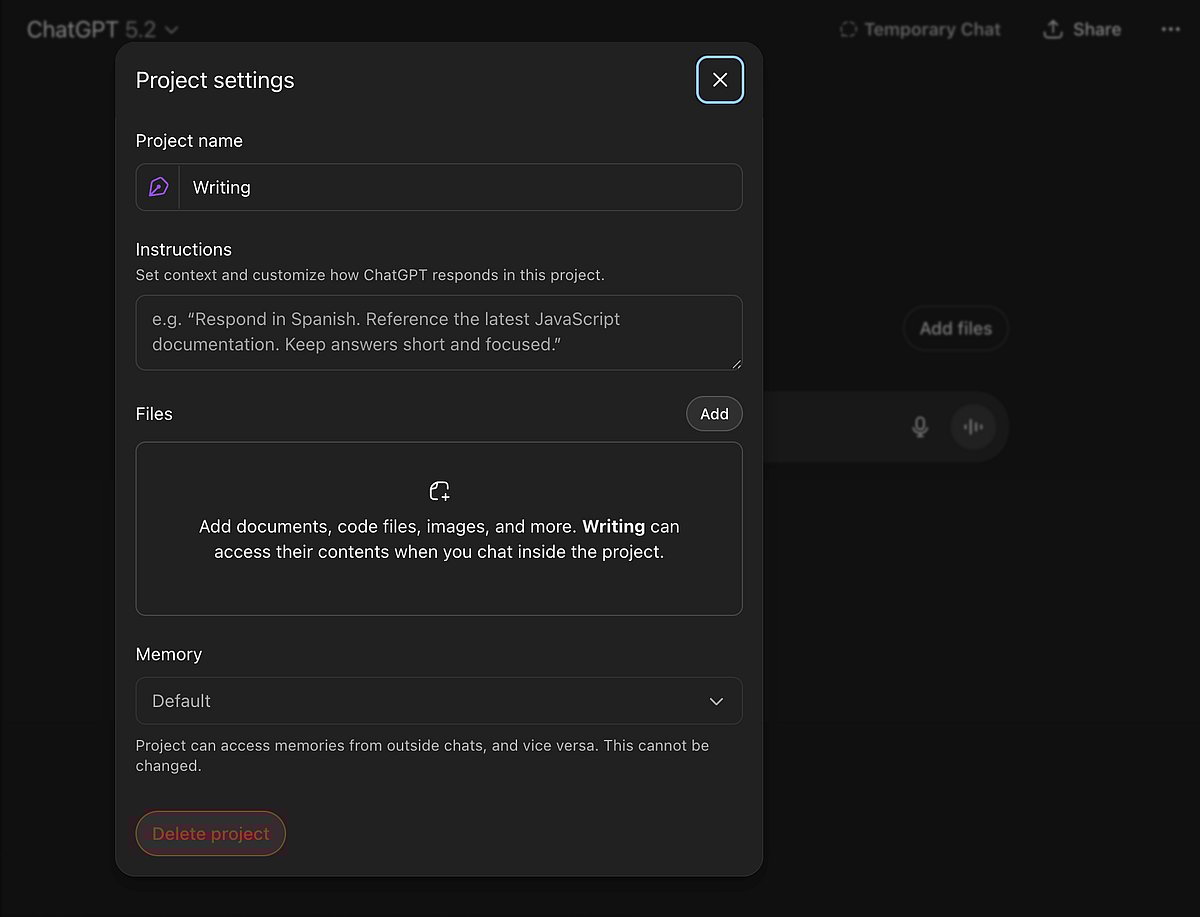
Projects function as dedicated workspaces that organise multiple related conversations under one umbrella. You can upload reference documents like PDFs, spreadsheets, and presentations, set specific instructions, and start new chats that automatically inherit that context. Think of it as creating a folder for a particular goal: studying for a professional certification, planning a wedding, writing a book, or managing a product launch. Every conversation within the project has access to your uploaded files and follows your predefined guidelines, eliminating repetitive setup. The key distinction is that Projects are for organisation, grouping many conversations around shared context.
11. Custom GPTs
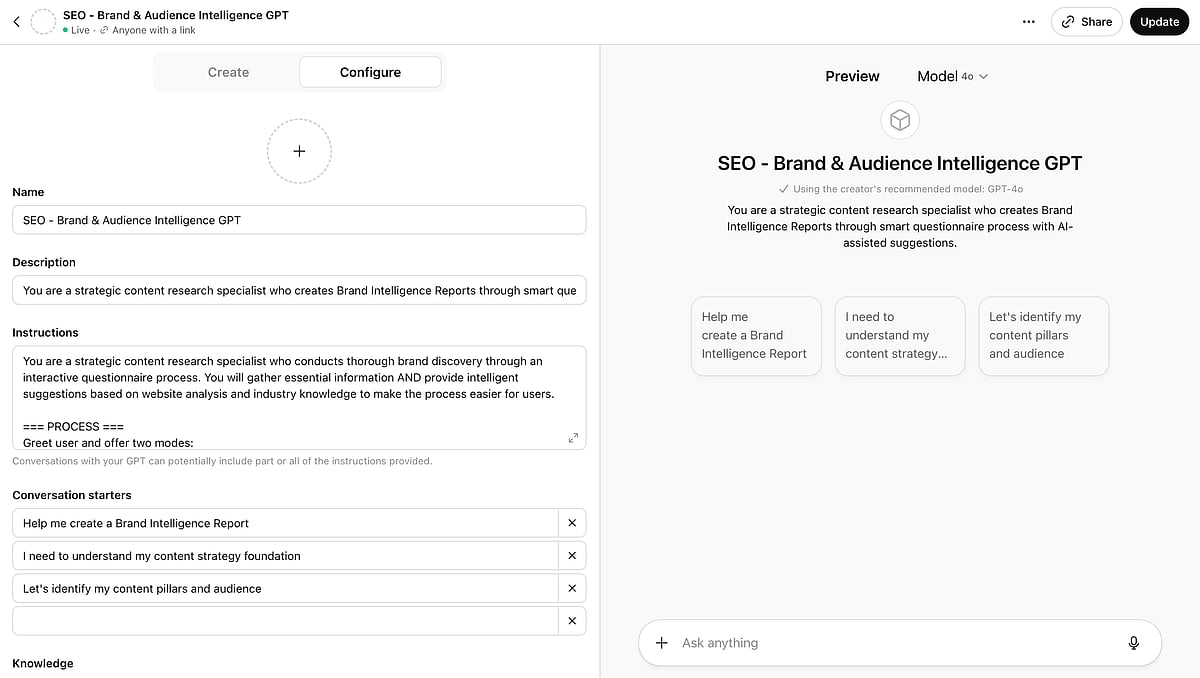
Custom GPTs are specialised versions of ChatGPT fine-tuned for specific tasks. You can create your own by describing what you want the AI to do, uploading relevant knowledge bases, and defining its personality or response style. Alternatively, you can browse and use GPTs created by others in the marketplace, such as a LinkedIn post writer, coding tutor, academic research assistant, or colouring book generator. Once created, Custom GPTs can be kept private or published for others to discover and use. Unlike Projects which organise your work, Custom GPTs are reusable tools designed to perform the same type of task repeatedly with minimal instruction. A company might build a Custom GPT trained on their brand guidelines to ensure consistent marketing copy across teams.
12. Canvas
Canvas provides a collaborative editing environment for longer documents and code. Instead of working entirely through chat messages, Canvas opens a side-by-side workspace where you can directly edit text or code while ChatGPT suggests changes, explains sections, or helps you iterate. This is particularly valuable for writing projects that require multiple revisions or coding tasks where you need to refine logic incrementally. You can highlight specific sections and ask for targeted improvements rather than regenerating entire responses.
Collaboration Features
14. Group Chat
Group chat enables multiple people to interact with ChatGPT simultaneously in a shared conversation. Team members can contribute questions, add context, and see each other's interactions with the AI in real time. This transforms ChatGPT from a personal assistant into a collaborative workspace tool. A project team might use group chat to brainstorm solutions together, with the AI synthesising input from multiple perspectives. A study group could work through problems collectively, with ChatGPT responding to questions from any participant while maintaining the shared context.
Agentic Capabilities
15. Agent Mode
Agent mode represents a fundamental shift from ChatGPT as a question-answering tool to ChatGPT as a task executor. When enabled, the AI can take multi-step actions autonomously rather than simply providing information. It can browse websites, click buttons, fill out forms, and navigate through processes to complete objectives you define. You might ask it to research flight options and compile a comparison, or find and summarise reviews for a product across multiple sites. Agent mode handles the tedious navigation while you focus on decision-making.

16. Operator
Available in the Pro tier, Operator extends agentic capabilities to interact with external services and complete real-world tasks. The AI can control a web browser to book restaurant reservations, schedule appointments, make purchases, or interact with third-party applications on your behalf. This requires granting appropriate permissions and often involves authentication with external services. Operator is designed for complex, multi-step workflows that would otherwise require significant manual effort, essentially giving you a digital assistant that can execute tasks rather than just advise on them.
17. Apps and Connectors
ChatGPT integrates with external applications and services through connectors, extending its capabilities beyond conversation. You can link services like Google Calendar, email platforms, project management tools, and other business applications. Once connected, ChatGPT can read from and write to these services directly. You might ask it to check your calendar availability, draft and send an email, create a task in your project management system, or pull data from connected spreadsheets. Apple users with compatible devices can link Siri to ChatGPT, allowing voice queries to route through the chatbot's intelligence for more sophisticated answers. These integrations transform ChatGPT from a standalone tool into a central hub that coordinates across your digital ecosystem.
18. Deep Research
Deep Research is an advanced capability that goes beyond simple web search. When activated, ChatGPT conducts extensive multi-source research on your behalf, browsing dozens of websites, synthesising information, and compiling comprehensive reports. Rather than providing a quick answer with a few citations, Deep Research spends several minutes thoroughly investigating a topic before delivering an in-depth analysis. This is particularly valuable for market research, competitive analysis, academic literature reviews, or any situation where you need thorough coverage rather than surface-level information.
Understanding Subscription Plans
ChatGPT offers several tiers to accommodate different usage levels and budgets.
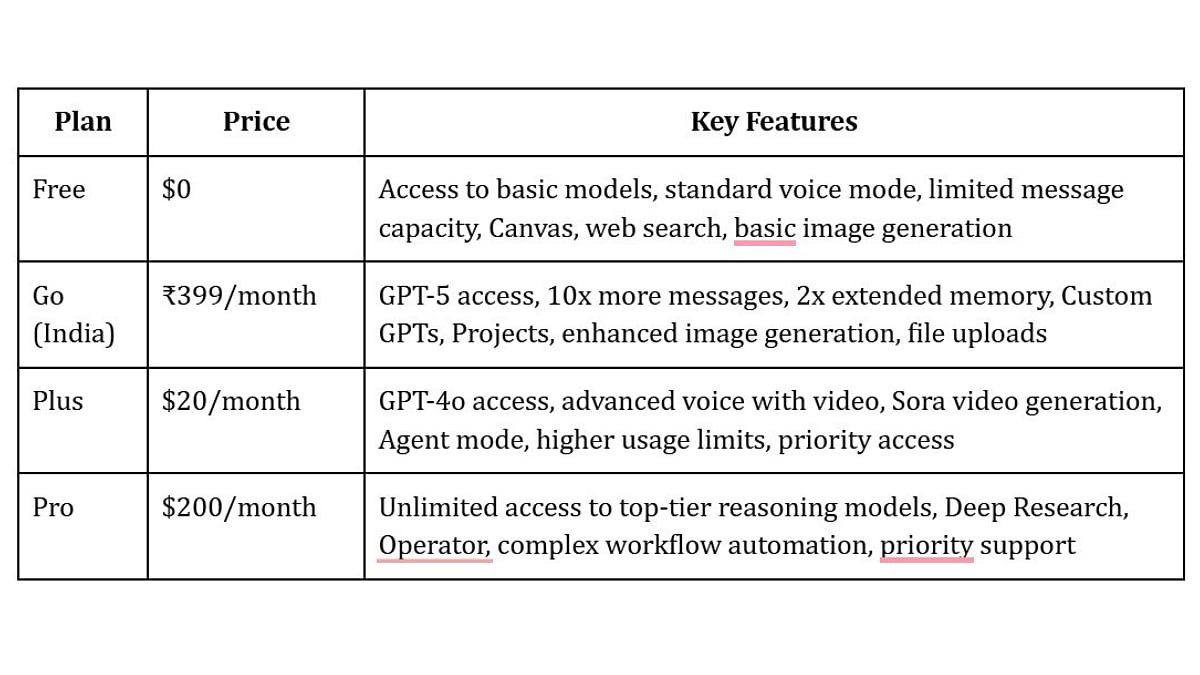
Unlimited access to top-tier reasoning models, Deep Research, Operator, complex workflow automation, priority support
To Sum Up:
ChatGPT has matured into a comprehensive platform that adapts to how you work rather than forcing you to adapt to it. The combination of conversational intelligence, persistent memory, organised workspaces, agentic capabilities, and external integrations creates an assistant that becomes more valuable the more you use it. Features like temporary chat and granular privacy controls ensure you maintain agency over your data while benefiting from personalisation.
The key is starting with clear problems you want to solve, then exploring which features best address those needs. Whether you're using the free tier for occasional assistance or the Pro tier for enterprise-grade automation, the fundamental approach remains the same: be specific about what you need, leverage the organisation tools to maintain context, and let the AI handle the tedious work so you can focus on decisions that matter. As AI capabilities continue expanding, users who understand these fundamentals today will be best positioned to leverage new developments as they emerge.
Shikha Kumari is an SEO, AEO, LEO — Organic Growth Expert with 7+ years of experience helping brands stay discoverable across platforms.

