The Unique Identification Authority of India (UIDAI) has officially announced that the mAadhaar app will soon be discontinued. In its place, UIDAI has unveiled a redesigned Aadhaar application built for a privacy-first era. If you are still on mAadhaar, here is everything you need to know before the switch becomes mandatory.
Why UIDAI is retiring mAadhaar?
The mAadhaar app served its purpose well, but it was built for a different time. Its core function was that of a digital wallet for your Aadhaar card. Every time a user shared their Aadhaar at a hotel, hospital, or government office, they exposed their full identity - Aadhaar number, date of birth, and home address.
The new app addresses this directly through the principle of data minimisation. Users now share only what is absolutely necessary for a given transaction, nothing more. The redesign has been developed in alignment with India's Digital Personal Data Protection (DPDP) Act, reflecting the government's broader push to bring Aadhaar services in line with modern privacy standards.
What is the new Aadhaar app?
The new app is available on both the Google Play Store and the Apple App Store under the name 'Aadhaar,' identifiable by the Pehchaan logo. It has been built from the ground up with upgraded security architecture, a cleaner interface, and a range of features that the older mAadhaar app simply did not offer. It supports 13 Indian languages and is compatible with Android 9 or above and iOS 16 or above.
Key features:
1. Face authentication replaces OTP-only logins
2. Service providers can scan a digitally signed QR code directly from your screen to confirm your identity.
3. Selective data sharing is now available. If a service only needs to confirm your age, you can share just that. Name, address, gender, photo, mobile number, or Aadhaar status can each be shared individually, without exposing any other personal detail.
4. The new Aadhaar app supports up to five Aadhaar profiles on a single device, allowing families to manage multiple identities conveniently under one roof.
5. Users can now update their registered mobile number directly through the app using face authentication and a nominal fee.
6. Users can lock their fingerprint, face, and iris data directly from the app to prevent unauthorised access.
Your mAadhaar data will not migrate automatically. UIDAI has confirmed that all previously downloaded Aadhaar PDFs, saved QR codes, cached data, and family member profiles stored in the old app will not carry over to the new one. Every profile, yours and those of any family members, will need to be added again manually in the new app.
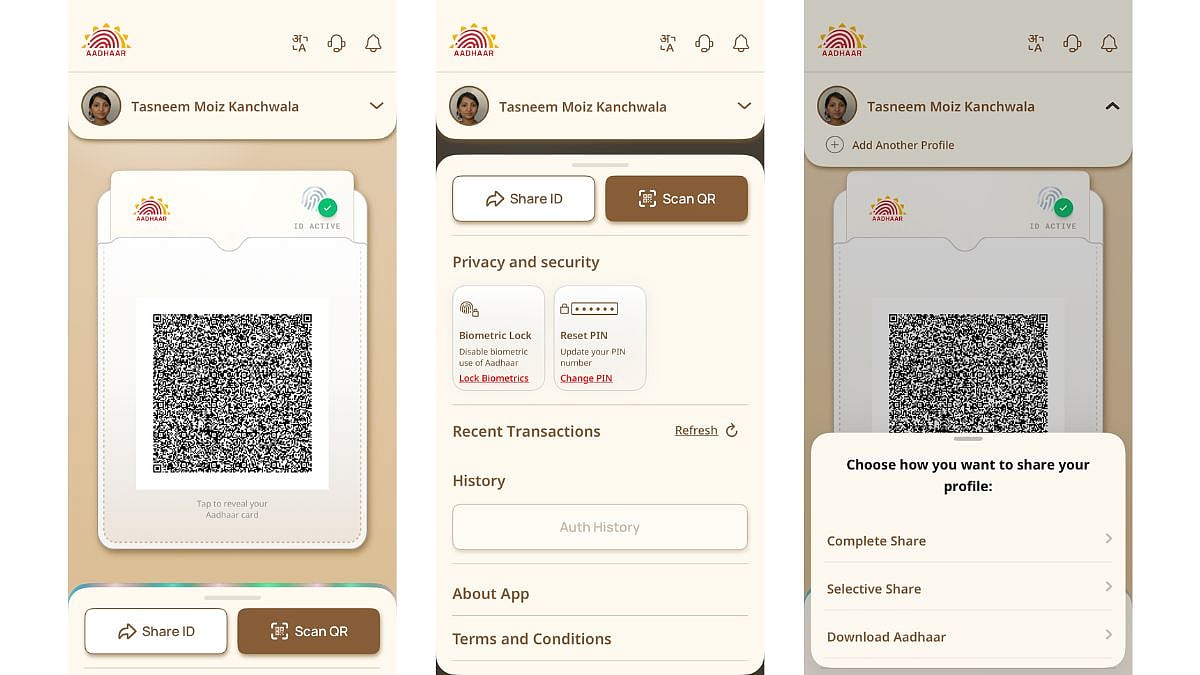

Step-by-Step Guide: How to Download & Register on the New Aadhaar App
1. Search for "Aadhaar" by UIDAI on the app store and look for the Pehchaan logo to confirm it is the official listing. Download and install it. Do not use third-party APK links or unofficial sources.
2. On opening the app for the first time, you will be prompted to choose your language from 13 available Indian languages.
3. Enter the mobile number linked to your Aadhaar. An OTP will be sent to that number. Enter it to verify and proceed.
4. The app may prompt a live facial scan during setup as an added layer of identity verification. Ensure you are in a well-lit environment and follow the on-screen instructions.
5. Create a security PIN or enable fingerprint or face unlock for the app on your device. UIDAI advises doing this immediately after installation, before adding any profiles.
6. Enter your 12-digit Aadhaar number and complete an additional OTP verification to link your profile to the app.
7. Each family member's Aadhaar profile must be added individually using their Aadhaar number and OTP. The app supports up to five profiles under a single registered mobile number.
8. Once all profiles are set up and visible in the new app, you can safely uninstall the old mAadhaar application from your device.

