
Christmas is almost here and the annual ritual to play Secret Santa has arrived. Secret Santa, an old game, that usually entails users making chits, picking one, and then buying a gift for the person anonymously, has been a game passed down through generations. People usually play this game among friends, colleagues in offices, and even with. Earlier, Secret Santa required people to all be in the same room together, to be able to pick up chits. However, with the advancement in technology, the need to be in the same room is completely gone.
There are a host of apps that now enable users to play Secret Santa sitting in the comfort of their homes, without having to meet and pick chits. One of our favourite app is listed down below:
drawnames | Secret Santa app
The drawnames app is by far the most easiest and functional Secret Santa app that I’ve used. It is available on both – Google Play Store and Apple App Store. The app has been downloaded more than 10 lakh times, and over 35 million names have been drawn. The app allows you to set a wishlist and also has a Gift Finder section that offers suggestions. You can also easily set exclusions, meaning who shouldn’t draw who. This is particularly useful if husband and wife are together playing in the Secret Santa game.
Coming to security, it is important to note that drawnames collects data like name, email address, user IDs and other information. It may also collect photos and videos based on the permissions you give. On the official listing, the developer says that the app doesn't share user data with other companies or organisations.
Drawnames truly simplifies gift exchanges and helps manage wish lists. Whether it's for Christmas, Hanukkah, Diwali, Kwanzaa, or any other occasion. drawnames helps organising and gift exchanging an easy task.
How to use the drawnames app and create a Secret Santa game
1. Download the app from Google Play Store or Apple App Store.
2. There is no account required, however you can sign-in to keep your wish list and celebrations accessible.
3. Select all the permissions upon installation. Give access to whatever you need to.
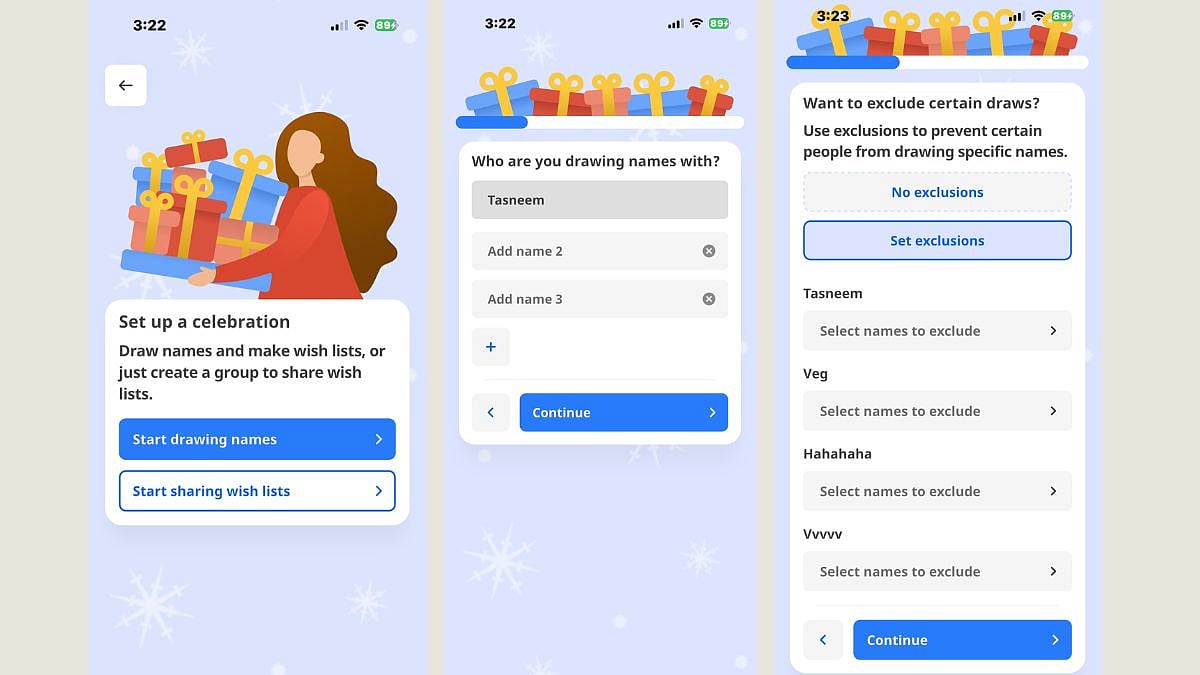
4. Click on ‘Create new celebration. Enter your name in the given box. You are now the organiser of the Secret Santa game
5. Next step would be to add all the other names participating in the Secret Santa game
6. Select exclusions for each name added.
7. Create a name for the celebration. For instance, Secret Santa 2025, Diwali Gifts 2025,etc
8. Select a date for when you are celebrating, mention the budget on how much you should spend.
9. A link will be generated of the celebration. Share this link with all of the users participating in the Secret Santa game.
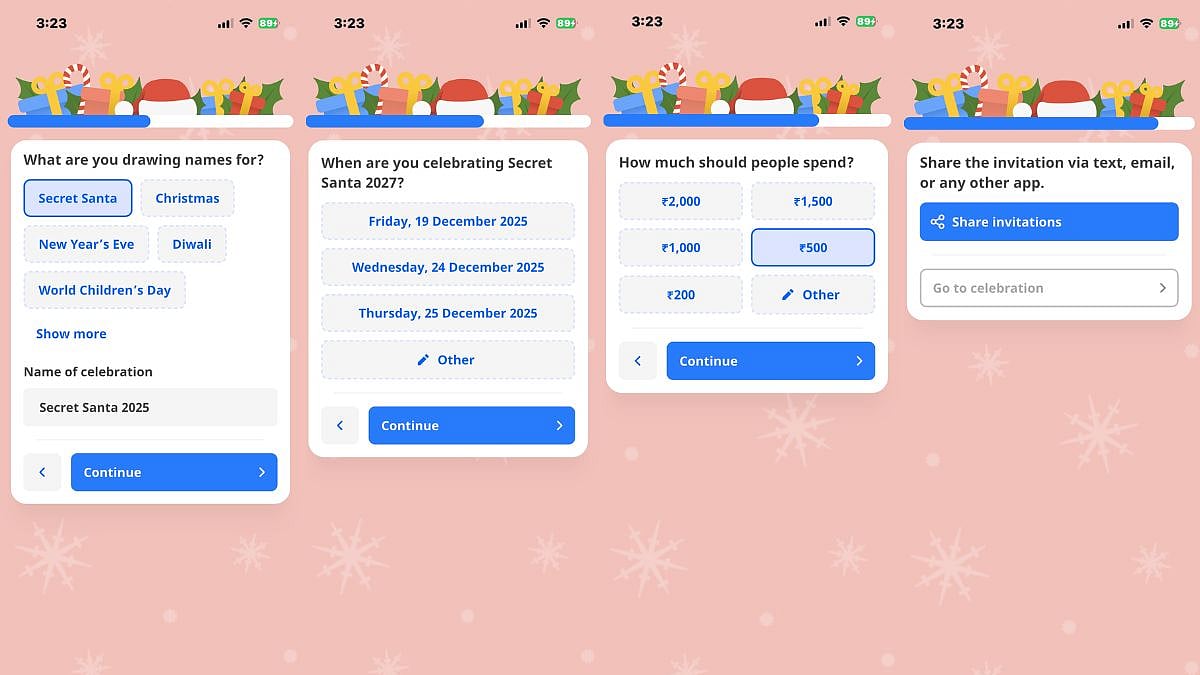
10. That’s it! You can now draw your own name and see who has drawn and who is left from the dashboard.

