
Want to buy an iPhone 16 Pro without one big bill? The EMI Network Calculator shows you the monthly cost in seconds.
Big purchases can put pressure on monthly budgets. Whether it is a smartphone, a laptop, or home appliances, paying the full amount upfront is not always possible. This is where the EMI Network Calculator and Bajaj Finserv Insta EMI Card step in to make buying easier and clearer.
With this tool, you gain:
. Quick planning of monthly payments
. Clear view of down payment needs
. Confidence to choose a tenure that fits the budget
. Simple comparison of options for big-ticket products
The EMI Network Calculator helps you estimate monthly instalments before you buy, allowing you to set expectations early. Pairing it with the Bajaj Finserv Insta EMI Card gives you instant access to a generous pre-qualified card loan offer amount. So, if you're looking for an upgrade, you can easily estimate the iPhone 16 Pro EMI to see if it fits your monthly income.
What is the EMI Network Calculator?
The EMI Network Calculator is an online tool that helps you estimate monthly instalments and down payments before making a purchase. It is available on the Bajaj Finserv website and works across multiple product categories.
Here is what you need to enter:
● Product price or total cost of the item
● EMI scheme, which includes tenure and down payment structure (for example, 12x4 means 4 EMIs upfront and 8 more over time)
The calculator then shows:
● Monthly EMI amount
● Down payment required
However, please note that the results are indicative and do not constitute formal loan approval. They help you plan, but should be confirmed during checkout.
Why use an EMI Network Calculator before you buy
There are multiple benefits of planning with the calculator:
● You can budget monthly expenses in advance
● It helps compare different EMI schemes side by side
● You avoid surprises at checkout
With the Bajaj Finserv EMI network, you gain access to flexible tenures and pre-approved offers that make repayment easier.
How the EMI Network Calculator works
Here are the simple steps to calculate your EMI:
● Access the calculator on the official Bajaj Finserv website
● Enter the product price in the input field
● Select an EMI scheme like 12x4, where 4 EMIs are paid upfront
● View the monthly EMI and down payment amounts displayed instantly
● Adjust the tenure and down payment to test different outcomes
Pro tip: Use the Bajaj Finserv Insta EMI Card for fast checkouts at partner stores and online platforms.
Why use the Bajaj Finserv Insta EMI Card
The Bajaj Finserv Insta EMI Card is a pre-qualified digital financing solution that works at over 1.5 lakh partner stores across India. It also integrates with all major e-commerce platforms, making it ideal for online shopping.
Key benefits include a generous card loan offer amount of up to Rs. 3 lakh, tenure options from 3 to 60 months, nil foreclosure charges, and instant approval. The card eliminates the need for repeated loan applications and streamlines the buying process.
When you use the EMI Network Calculator with the Insta EMI Card, you get accurate estimates based on real schemes. This pairing helps you make confident decisions during high-value purchases, like the iPhone 16 Pro EMI.
Features and benefits of Bajaj Finserv Insta EMI Card
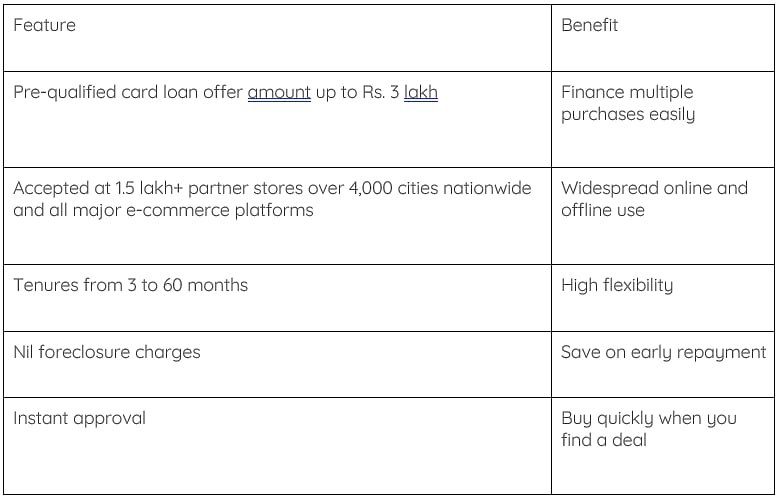
Additional practical benefits include:
● Zero down payment offers on select products
● Improved credit score with timely EMI payments every month
How to use the EMI Network Calculator with the Insta EMI Card
Follow this checklist to effectively combine the benefits of the EMI Network Calculator and the Insta EMI Card:
● Find your product price on the website or app
● Choose an EMI scheme that matches your budget
● Enter the details in the calculator
● Compare tenure options to see the monthly instalments
● See the down payment and the monthly EMI displayed clearly
● Pick the plan that matches your income and expenses
● Use the Insta EMI Card to complete the purchase online or at a partner store
This process takes less than five minutes and gives you full control over your spending.
How to responsibly take on EMIs
Taking on credit requires financial discipline. Keeping these tips in mind will hold you in good stead:
● Check your monthly income against the EMI amount before committing
● Keep EMIs below a comfortable percentage of income, ideally under 40%
● Avoid taking overlapping large EMIs that strain your budget
● Prefer longer tenure only if you can afford the extra interest cost
● Pay instalments on time to boost your credit score over time
● Use a down payment to lower the monthly EMI when possible
● Keep an emergency savings buffer before taking EMIs
● Read the terms for any processing fees or penal charges
The EMI Network Calculator removes guesswork from big purchases. It shows you exactly what you will pay each month and how much you need upfront. Pairing it with the Bajaj Finserv Insta EMI Card simplifies checkout, speeds up approval, and gives you flexibility across tenures. Whether you are planning an iPhone 16 Pro EMI purchase or planning festive shopping, this combination puts you in control.
Use the Bajaj Finserv EMI Network Calculator now to estimate your iPhone 16 Pro EMI and apply for the Bajaj Finserv Insta EMI Card. Try different tenures and down payments to find the plan that works best for your budget.

