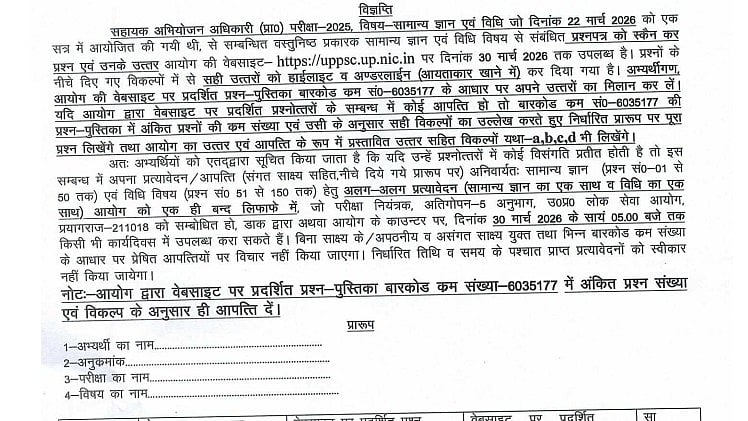
UPPSC APO Answer Key 2026: UPPSC has official releaded the UP APO Prelims Exam answer key pn their official website, uppsc.up.nic.in. The UP APO Prelims Exam was administered by the Uttar Pradesh Public Service on March 22, 2026, at several testing locations throughout the state. The official UP APO Answer Key 2026 is available for download for thousands of candidates who took the Assistant Prosecution Officer exam.
Candidates can verify their answers to the questions and determine the anticipated scores from the APO exam using the answer key. All of the right solutions to the exam questions are included in the official UP APO Answer key.
Direct link for official announcement
UPPSC APO Answer Key 2026: Steps to download answer key
Step 1: Go to UPPSC's official website, uppsc.up.nic.in
Step 2: Locate the UP APO Answer Key 2026 link on the homepage.
Step 3: To access the answer key site, click the link.
Step 4: To log in, enter your registration number, password, or birthdate.
Step 5: The response sheet and answer key will show up on the screen.
Step 6: Download the file and store it for later use.
Direct link to download answer key
UPPSC APO Answer Key 2026: Details mentioned on answer key
The UP APO Answer Key 2026 will include key details related to both the examination and the candidate’s responses. It will mention the candidate’s name, roll number, and registration number, along with the exam name and post applied for. The answer key will also carry exam date and shift details, question paper set or booklet code, and a list of questions with correct answers. Additionally, it will display the responses marked by the candidate in the exam.
UPPSC APO Answer Key 2026: Objection window
Candidates may challenge any inaccurate responses in the preliminary answer key by using the UP APO Answer key 2026 Objection window. Up to March 30, 2026, candidates may file objections online by choosing the question and attaching reliable supporting documentation.
UPPSC APO Answer Key 2026: How to raise the objection window
Step 1: Go to UPPSC's official website, uppsc.up.nic.in
Step 2: On the homepage, select the "UP APO Answer Key 2026 – Objection" option.
Step 3: Enter your date of birth or registration number and password to log in.
Step 4: Decide the question or questions you wish to challenge
Step 5: Provide reliable evidence or proof to support the objection.
Step 6: Fill out the objection form and save a copy for your records.
Candidates are advised to visit the official website for additional information.
