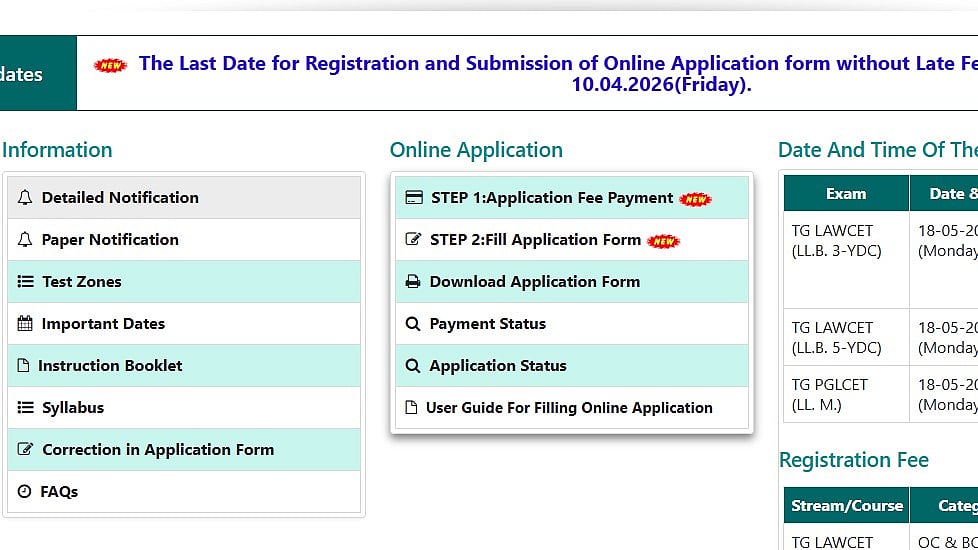
TS LAWCET 2026: The Telangana State Law Common Entrance Test (TS LAWCET) 2026 application deadline has been extended by Osmania University on behalf of TGCHE to April 10, 2026, with no late fees. Candidates can visit the official website lawcet.tgche.ac.in to complete the TG LAWCET 2026 application form. Incomplete forms will be rejected throughout the registration process, thus students must finish the TS LAWCET 2026 online application process before the deadline.
For admission to 3-year and 5-year LLB programs at participating colleges in Telangana, authorities are administering the TS LAWCET 2026 test. In order to complete the application, students must first pay the online application fee and then fill out the form with their academic and personal information.
TS LAWCET 2026: Important dates
Registration (without late fee): April 1 to April 10, 2026
Registration (late fee ₹500): April 15 to April 20, 2026
Registration (late fee ₹1000): April 25 to April 30, 2026
Registration (late fee ₹2000): May 5, 2026
Registration (late fee ₹4000): May 10, 2026
Registration (late fee ₹10,000): May 13, 2026
TS LAWCET 2026 Exam Date: May 18, 2026
TS LAWCET 2026: Steps to apply
The following actions can be taken by applicants to apply for the TG LAWCET and PGLCET 2026:
Step 1: Go to lawcet.tgche.ac.in, the official TGCHE website.
Step 2: On the homepage, select the Fill Application Form.
Step 3: Enter the candidate's name, birthdate, email address, and mobile number.
Step 4: Upload scanned documents, such as a scanned signature (less than 30KB/jpeg file) and a passport-sized photo (less than 50KB/jpeg format).
Step 5: Click the "Application Fee Payment" tab to make the online payment. By selecting the "know your payment status" option, candidates can also confirm the payment status.
Step 6: Verify everything again, click "Submit," and save the application for later use.
