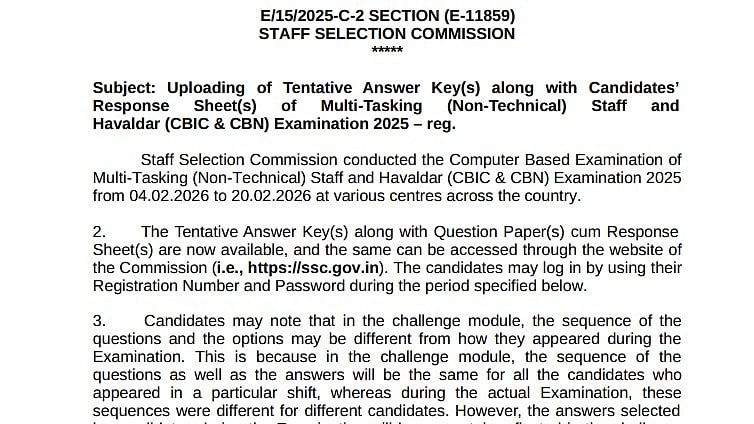
SSC MTS 2026 Answer Key Objection Window: The SSC MTS Answer Key 2026 has been made available by the Staff Selection Commission. Applicants who took the Multi-Tasking (Non-Technical) Staff and Havaldar (CBIC & CBN) Examination 2025 can view the provisional key at ssc.gov.in, the SSC's official website. The objection window has opened in addition to the answer key. The objection window will be open until 6 p.m. on March 6, 2026. Candidates may object if they are dissatisfied with the answer key.
After the time restriction mentioned above, tentative answer keys and response sheets will no longer be accessible. Under no circumstances will any individual requests for Response Sheets or Tentative Answer Keys be accepted in the future.
Direct link for official notification
SSC MTS 2026 Answer Key Objection Window: Important dates
Computer-based exam: February 4 to 20, 2026
Objection window open: March 4, 2026
Last date to raise objections: March 6, 2026 (6:00 PM)
Note: After March 6, 2026 answer key and response sheets will not be accessible
SSC MTS 2026 Answer Key Objection Window: Steps to download answer key
Candidates can use the instructions below to download the solution key:
Step 1: Go to ssc.gov.in, the SSC's official website
Step 2: On the home page, click the SSC MTS Answer Key 2026 link.
Step 3: Candidates will need to input their login information on a new page.
Step 4: Your answer key will appear after you click publish.
Step 5: Examine and download the solution key.
Step 6: Save a physical copy of it in case you need it later.
SSC MTS 2026 Answer Key Objection Window: Fees to raise an objection
Per question challenged – ₹50 objection fee
SSC MTS 2026 Answer Key Objection Window: How to raise an objection
To raise obstacles for the SSC MTS exam in 2026, candidates might do the following:
Step 1: Visit the official website at ssc.gov.in.
Step 2: Select the link labelled "SSC MTS Tier 1 Answer Key 2025 – Challenge."
Step 3: Enter your password and registration/roll number to log in.
Step 4: From your response sheet, choose the question or questions you want to contest.
Step 5: For every objection, upload supporting documentation or an explanation.
Step 6: Use the online payment option to pay the required fee for each question.
Step 7: For your records, submit the objection form and download the confirmation receipt.
SSC MTS 2026 Answer Key Objection Window: Exam details
There were two sessions of the exam: Sessions 1 and 2. In the first session, there were forty questions for 120 points on problem-solving, reasoning, and mathematical and numerical skills. In the second session, there were fifty questions worth 150 points on general awareness and English language and comprehension. The applicants had forty-five minutes to finish both Sessions I and II.
Candidates can visit the SSC's official website for further information.

