PSEB Class 10 Result 2026: The Punjab School Education Board (PSEB) has declared the Punjab Board Class 10 (Matric) Result 2026 today, May 11, at 12:30 PM. The overall pass percentage this year stands at 94.52%.
Students who appeared for the examination can now check and download their scorecards by visiting the official website. To access the result, candidates need to enter their roll number in the login window.
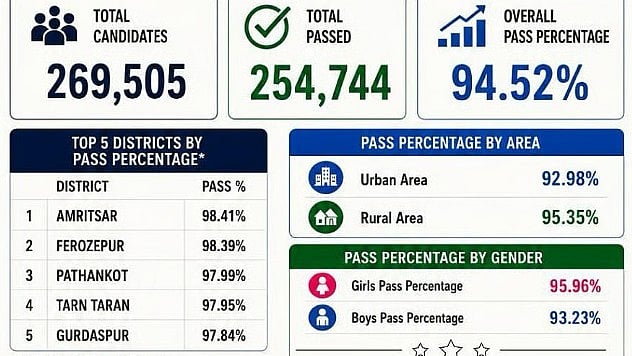
This year, 2,69,505 students appeared for the examination, out of which 2,54,744 successfully passed. The overall pass percentage stands at 94.52%. Harleen Sharma secured the first rank with 646 out of 650 marks (99.38%). Girls outperformed boys with a pass percentage of 95.96%, while boys recorded 93.23%. Students from rural areas achieved a higher pass rate (95.35%) than urban areas (92.98%).
PSEB Class 10 Result 2026: Overall Pass Percentage
The PSEB Class 10 Result 2026 Overall Pass Percentage Stands At 94.52%.
Key Highlights
Total candidates appeared: 2,69,505
Total students passed: 2,54,744
Overall pass percentage: 94.52%
Pass Percentage by Gender
In the PSEB Class 10 Result 2026, girls outperformed boys with a pass percentage of 95.96%, while boys recorded a pass percentage of 93.23%.
Girls: 95.96%
Boys: 93.23%
Pass Percentage by Areas
Students from rural areas performed better than those in urban areas, with pass percentages of 95.35% and 92.98%, respectively.
Rural areas: 95.35%
Urban areas: 92.98%
Top 5 Districts by Pass Percentage
Among districts, Amritsar emerged as the top performer with a pass percentage of 98.41%, followed closely by Ferozepur at 98.39%. Pathankot secured the third position with 97.99%, while Tarn Taran and Gurdaspur recorded pass percentages of 97.95% and 97.84%, respectively.
Amritsar — 98.41%
Ferozepur — 98.39%
Pathankot — 97.99%
Tarn Taran — 97.95%
Gurdaspur — 97.84%

PSEB Class 10 Result 2026: How to Check PSEB Class 10 Result 2026 Online
Step 1: Visit PSEB's official webpage.
Step 2: Select the "Results" section.
Step 3: Click the Class 10 Result 2026 link.
Step 4: Enter the necessary information, including your roll number.
Step 5: Choose "Submit."
Step 6: The outcome will appear on the screen.
Step 7: Once downloaded, save the marksheet for later use.
PSEB Class 10 Result 2026: Steps to check the result via SMS
Step 1: Launch the messaging app on your mobile device.
Step 2: Type PB10 followed by a space, then your roll number (for example, "PB10 10029876").
Step 3: Send a message to 5676750.
Step 4: Your Punjab School Education Board Class 10 results will be sent to the same mobile number via SMS.
PSEB Class 10 Result 2026: How to Download PSEB Class 10 Marksheet via DigiLocker
Step 1: Open the DigiLocker app or go to digilocker.gov.in.
Step 2: Sign in with a mobile number or Aadhaar OTP.
Step 3: Move to the Issued Documents section.
Step 4: Select Punjab School Education Board (PSEB).
Step 5: Select Class 10 Mark Sheet 2026.
Step 6: Enter your roll number and required information.
Step 7: Click "Get Document."
Step 8: Download and save the digital marking sheet.
