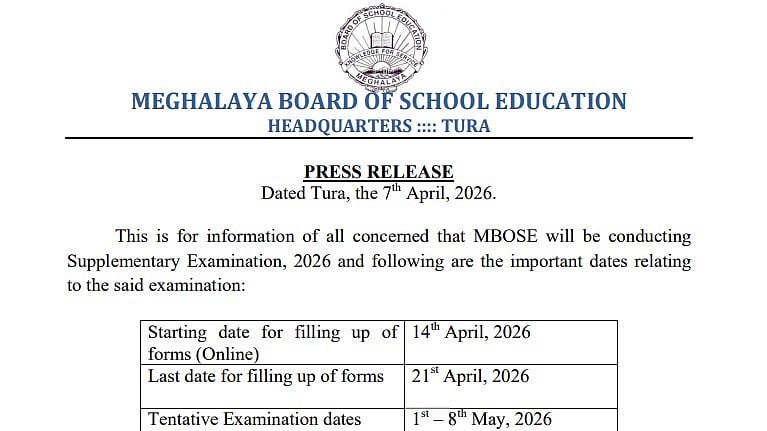
Meghalaya MBOSE SSLC 10th Supplementary Exam 2026: The Meghalaya Board of School Education has released a notification regarding the supplementary dates on the official website at mbose. in. The online form submission for the MBOSE SSLC 10th Supplementary Exam 2026 begins on April 14, 2026.
The Meghalaya Board of School Education (MBOSE) released the Class 10 (SSLC) Result 2026 today, April 7, 2026, at 11 a.m. on its official website. Candidates can access the results by entering their admit card roll number.
Candidates who did not pass the main SSLC Examination are eligible to apply for the Supplementary Examination in all failed subjects. Candidates must apply through the designated Supplementary Examination Centres, which will be notified in due time.
Meghalaya MBOSE SSLC 10th Supplementary Exam 2026: Important Dates
Candidates can check out the important dates for the MBOSE SSLC supplementary below:
Starting date for online form submission: 14 April 2026
Last date for online form submission: 21 April 2026
Tentative examination dates: 1 May to 8 May 2026
Check The Official Notification Link Here
Meghalaya MBOSE SSLC 10th Supplementary Exam 2026: Steps to check the result online
Candidates can check out the steps below to download the Meghalaya MBOSE SSLC 10th Result 2026:
Step 1: Go to the official website of the Meghalaya Board, megresults.nic.in.
Step 2: Click the "Result" or "Class 10 Result 2026" link on the homepage.
Step 3: Enter your admit card's roll number.
Step 4: Choose Submit once the CAPTCHA verification is complete.
Step 5: Subject-wise grades, overall marks, grade or division, and pass/fail status will all be shown on the screen.
Step 6: Save the outcome for your personal use after downloading it.
Direct link to check the result

