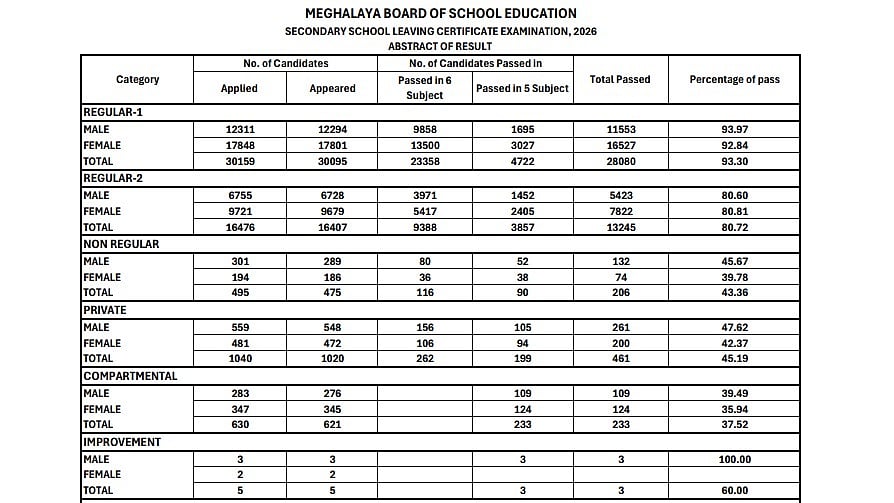
MBOSE SSLC 10th Result 2026: The Meghalaya Board of School Education (MBOSE) has declared the Class 10 (SSLC) Result 2026 today, April 7, 2026, at 11 am on the official website. Candidates who appeared for the Secondary School Leaving Certificate Examination can now access and download their results from the official website at megresults.nic.in.
This year, the overall pass percentage stands at 86.84%, reflecting the performance of students across the state.
MBOSE SSLC 10th Result 2026: Overall Pass Percentage Details
Total Candidates Applied: 48,805
Total Candidates Appeared: 48,623
Total Passed (Overall): 42,228
Overall Pass Percentage: 86.84%
MBOSE SSLC 10th Result 2026: Category-wise Pass Percentage
Regular-1: 93.30%
Male: 93.97%
Female: 92.84%
Total: 93.30%
Regular-2: 80.72%
Male: 80.60%
Female: 80.81%
Total - 80.72%
Non-Regular: 43.36%
Male: 45.67%
Female: 39.78%
Total - 43.36%
Private: 45.19%
Male: 47.62%
Female: 42.37%
Total - 45.19%
Compartmental: 37.52%
Male: 39.49%
Female: 35.94%
Total - 37.52%
Improvement: 60.00%
Male: 100.00%
Female: Data not specified
Total - 60.00%
Additional Highlights:
Students Passed in 6 Subjects: 33,124
Students Passed in 5 Subjects: 9,104
MBOSE SSLC 10th Result 2026: Last Year’s Result Highlights
In 2025, the MBOSE SSLC Class 10 results were declared on April 5. The overall pass percentage stood at 87.10%.
Two students secured the top rank last year, Leisha Agarwal from St Margaret's Higher Secondary School, Shillong, and Avila Kathrene P Lyngdoh from North Liberty Higher Secondary School, Jowai, both scoring 582 marks.
The second position was jointly secured by Evanshan Nongrum and Pori Pandey, while the third position was shared by Anushmita Choudhury, Sourav Pandey, and Eulogemene Rilin L Suting.
MBOSE SSLC 10th Result 2026: How to Download MBOSE SSLC Result 2026
Candidates can check out the steps below to access their results online:
1. Go to the official website of MBOSE at megresults.nic.in.
2. Click on the ‘MBOSE SSLC Result 2026’ link available on the home page.
3. Enter the required login credentials.
4. Click on submit.
5. Your result will be displayed on the screen.
6. Download and take a printout for future reference.
Direct link to check the result
Students are recommended to carefully check all details on the scorecard and a copy for admission and documentation purposes.

