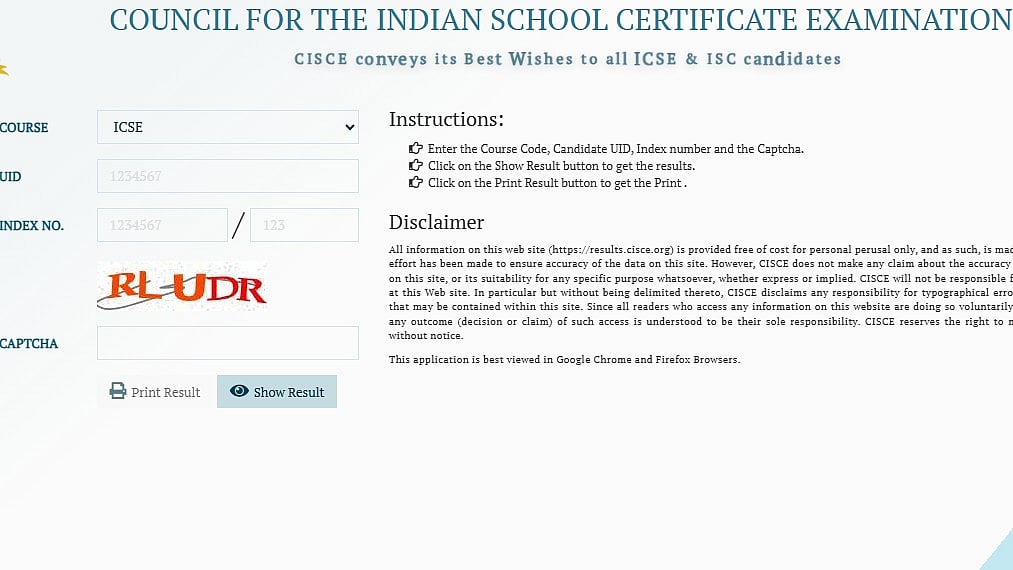
ICSE Class 10 Result 2026: The Council for the Indian School Certificate Examinations (CISCE) is expected to announce the ICSE Class 10 results 2026 by the last week of April, following its usual result timeline. Though the exact date and time have not been notified, there is a possibility that the results might be declared on April 28.
The ICSE Class 10 exams have been held between February 17 and March 30, 2026. Generally, the results for any examination are declared one month after the completion of the examination.
The ICSE results were declared on April 30 last year, whereas this year they have been declared on May 6. Based on the above information, there are chances that the results for both ICSE Class 10 and ISC Class 12 might be declared together by the Board via a press conference.
ICSE Class 10 Result 2026: ICSE Examination Dates 2026
Dates for ICSE Exams 2026: February 17 to March 30
Expected date of declaration of results: Last week of April 2026
Estimated results declaration date: April 28, 2026
Expected time: 11 AM
Admit card details should be kept handy, as candidates will need the same to log into the result portal to check the scores.
ICSE Class 10 Result 2026: Steps to check the result
Step 1: Go to official website – results.cisce.org
Step 2: Click on the “ICSE Result 2026” option on home page
Step 3: Enter your Unique ID, Index No & Captcha code
Step 4: Click on the button “Show Result”
Step 5: Your result will be displayed on the screen
Step 6: Save the file for future reference and download your result
For checking ICSE mark sheets from digi locker students must log in to DigiLocker app using their linked aadhar card and select CISCE from the options available at “Issued Documents.”
ICSE Class 10 Result 2026: Steps to check the result via Digilocker
Step 1: Visit the website of DigiLocker or open the app
Step 2: Login using aadhar credentials or other credentials
Step 3: Go to Issued Documents/ Education Section
Step 4: Choose CISCE from the drop down menu available in Issued documents section
Step 5: Select ICSE Result 2026/ Mark sheet
Step 6: Enter UID and Index Number
Step 7: Click on Submit
Step 8: Your mark sheet will appear on the screen
Step 9: Download your mark sheet for further reference
As the result date approaches, students are advised to regularly check the official CISCE websites, cisce.org and results.cisce.org for confirmed updates.
