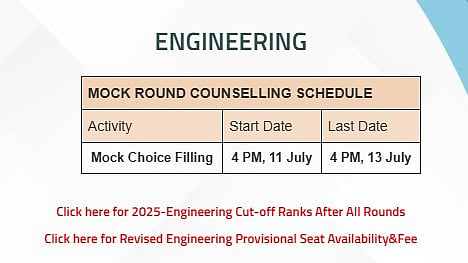
COMEDK UGET 2026 Counselling: The Consortium of Medical, Engineering, and Dental Colleges of Karnataka (COMEDK) will begin the mock counselling choice filling process for COMEDK UGET 2026 on tomorrow, July 11. Candidates who have successfully completed the counselling registration process can submit and lock in their preferred college and course choices until July 13, 2026, via the official counselling portal at comedk.org.
The mock counselling round is held prior to the actual seat allocation to help candidates understand the colleges and courses they are likely to secure based on their rank and submitted preferences. After the mock allotment results are announced, candidates will be able to modify and reorder their selections prior to the final seat allotment.
Candidates facing any issues can contact the COMEDK helpdesk at 080-697-962-66 or email studenthelpdesk@comedk.org for assistance.
COMEDK UGET 2026 Mock Counselling Schedule
Choice filling for mock allotment: July 11 to July 13, 2026
Mock allotment result: To be announced
Choice editing after mock allotment: To be announced
Final seat allotment: To be announced
COMEDK UGET 2026: How to Fill COMEDK UGET 2026 Counselling Choices
Candidates can follow these steps to complete the option entry process:
Step 1: Visit the official COMEDK counselling website at comedk.org
Step 2: Log in using the application number or User ID and password.
Step 3: Click on the 'Option Entry' section.
Step 4: Search for colleges and branches using filters such as institute name, course, or location.
Step 5: Add preferred colleges and branches to the option list.
Step 6: Arrange the selected choices in the desired order of preference.
Step 7: Save the choices and review them carefully.
Step 8: Lock the choices before the deadline.

