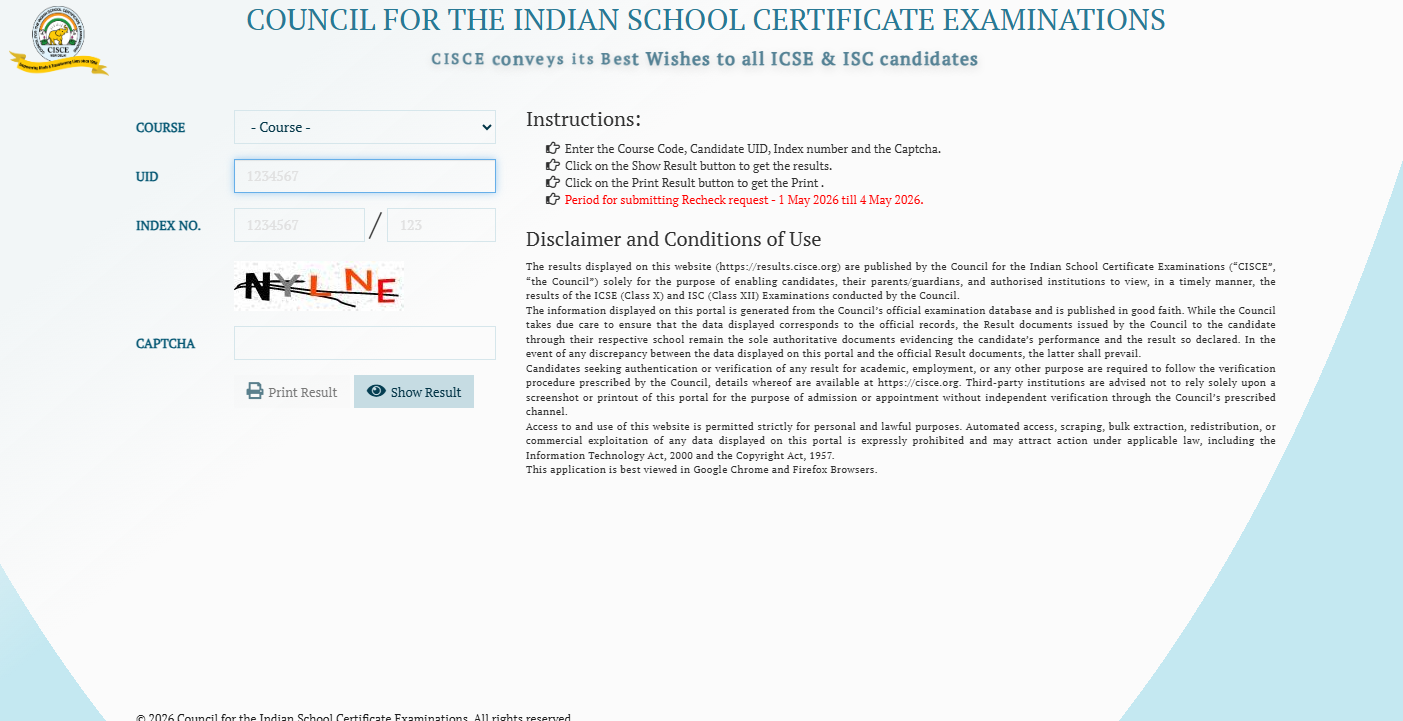
CISCE ICSE, ISC Result 2026: The Council for the Indian School Certificate Examinations (CISCE) has official announced the results of the ICSE and ISC 2026. Results will be available at results.cisce.org for both the ISC and ICSE Class 10th. Students must have their Index Number and UID available in order to view their scores.
Over 4 lakh applicants took the test. The ICSE 2026 exam took place from February 17 to March 30, 2026. The dates of the 2026 ISC results are February 12–April 3, 2026.
Direct link to check the result online
Direct link to check ICSE Examination results UMANG
Direct link to check ISC Examination results UMANG
CISCE ICSE, ISC Result 2026: Website to check the result
ICSE, ISC Result 2026: Steps to Check ICSE, ISC Result 2026 via SMS
Step 1: Launch the SMS app on your phone.
Step 2: Enter ICSE and email it to 09248082883.
Step 3: After entering ISC, send it to 09248082883.
Step 4: Receive your results by SMS on your mobile device.
CISCE ICSE, ISC Result 2026: Steps to check the result online
To download the results from the official portals, follow these steps:
Step 1: Visit the official website of the Board.
Step 2: Click on the link to the ICSE/ISC results.
Step 3: Enter your index number and seven-digit unique ID.
Step 4: Complete the captcha by following the directions.
Step 5: The screen will display your scorecard.
Step 6: Look it over and download it.
CISCE ICSE, ISC Result 2026: Steps to check the result via Digilocker
Step 1: Open the app or visit the official DigiLocker website.
Step 2: To log in, provide your phone number, Aadhaar, and OTP.
Step 3: If you're a new user, complete the signup process.
Step 4: Choose "Issued Documents."
Step 5: Select the relevant board (CISCE).
Step 6: Choose the URL for the Result/Marksheet 2026.
Step 7: Enter the required data, such as the roll number and exam year.
Step 8: Choose "Get Document."
Step 9: Your digital marksheet or outcome will appear on the screen.
Step 10: Download or save it for later use.
ICSE, ISC Result 2026: Steps to check the result via the UMAANG app
Step 1: Launch the UMANG app on your mobile device.
Step 2: Fill out the signup form if you're a new user or enter your existing login credentials.
Step 3: To find the relevant service, type "CISCE" into the app's search area.
Step 4: Select "ISC Result 2026" from the available options.
Step 5: Provide the required information, such as your roll number and additional credentials.
Step 6: You can view and download your ISC 2026 results after submitting.
CISCE ICSE, ISC Result 2026: Details mentioned on the marksheet
Important information about the student's performance will be included in the ICSE Class 10 marksheet. These consist of the student's name, UID, index number, school name, grades, pass or fail status, total marks earned, subject-specific marks, and overall percentage. After obtaining the marksheet, students should thoroughly review all of the information.
CISCE ICSE, ISC Result 2026: Improvement exam
Students can take the improvement exam between May 8 and May 14. The improvement exam is scheduled for June 15.
If they are unhappy with the results, they can ask for their grades to be reevaluated and verified. From May 1 through May 4, 2026, marks can be rechecked. The results of the rechecking will be announced within the first week of June. The results of the reevaluation will be announced during the last week of June or the first week of July.
