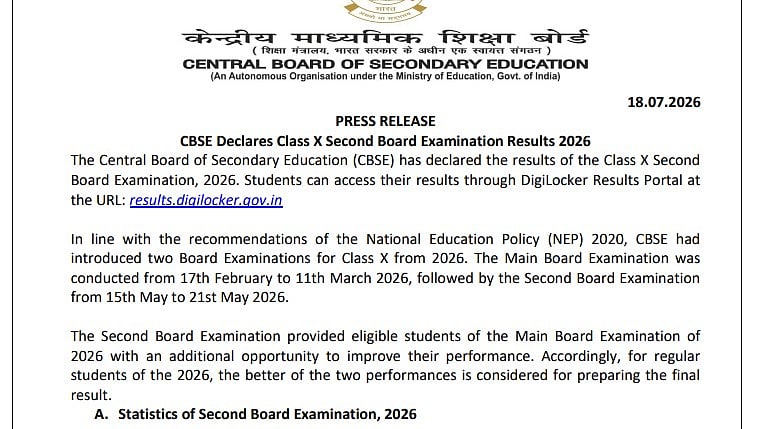
CBSE Class 10 Second Board Result 2026: The CBSE 10th second board results for 2026 have been made public by the Central Board of Secondary Education. The official website, cbseresults.nic.in, has the results. To download the results, students must fill out the required information.
Students can use the Umang App, Parinam Manjusha, Digilocker, IVRS, and SMS to access their CBSE 10th results. Students are required to pick up their marksheets from their schools. The 2026 CBSE 10th second board exam was scheduled for May 15–21.
Direct link to check the result
Direct link to read the official announcement
CBSE Class 10 Second Board Result 2026: Where to Check
cbse.gov.in
results.cbse.nic.in
DigiLocker
UMANG App
CBSE Class 10 Second Board Result 2026: Steps to check the result via SMS
Step 1: Launch your phone's SMS app.
Step 2: Use the required CBSE format to create a new message.
Step 3: Enter the necessary information, such as CBSE10, Roll Number, Center Number, School Number, and Date of Birth (DOB).
Step 4: Use your registered cell phone to send the SMS to 7738299899.
Step 5: Wait for the CBSE response notification.
Direct link to check the result
CBSE Class 10 Second Board Result 2026: Steps to check the result
Step 1: Visit the official CBSE results website at results.cbse.nic.in or cbse.gov.in.
Step 2: Click the "CBSE Class 10 Second Board Result 2026" link on the homepage.
Step 3: Input your roll number, school number, admit card ID, and any other required data.
Step 4: Click the "Submit" button.
Step 5: Your CBSE Class 10 Second Board Result 2026 will appear on the screen.
Step 6: Save the draft marksheet for later use after downloading it.
CBSE Class 10 Second Board Result 2026: Steps to check the result via IVRS
Step 1: If you are a Delhi local subscriber, dial 24300699.
Step 2: Dial 011-24300699 if you are phoning from outside of Delhi.
Step 3: Adhere to the instructions provided by the Interactive Voice Response System (IVRS).
Step 4: When requested, enter the necessary information, including your roll number.
Step 5: Pay close attention to the results information provided by the IVRS service and make a thorough note of the specifics for future reference.
CBSE Class 10 Second Board Result 2026: Steps to check the result via UMANG app
The following methods can be employed with the UMANG app to verify the result:
Step 1: Open the UMANG application.
Step 2: To log in, provide your mobile number.
Step 3: Search for "CBSE" or scroll down to select the "Education" category.
Step 4: Choose the "CBSE" board.
Step 5: Choose the ninth result.
Step 6: Fill out the admission card with your ID, year, class, and roll number.
Step 7: Click the "Submit" button.
Step 8: The results of the CBSE board are displayed.
CBSE Class 10 Second Board Result 2026: Details mentioned on result
Important details, including the exam name, board name, class, student's name, roll number, parents' names, date of birth, subject titles, and subject codes will all be included in the CBSE Class 10 second board result. The scorecard will include the final result status, which indicates whether the student passed or failed the test, placement grades, total marks earned, theoretical marks, and practical marks (if applicable).

