Asus Zenbook S14 (UX5406AA) Review: A Thin Laptop That Does Not Cut Corners
The Asus Zenbook S14 UX5406AA delivers a premium thin-and-light experience with a 3K OLED display, strong performance and impressive thermal management. Its 1.2kg Ceraluminum body feels durable, while battery life reaches 14–18 hours in real-world use. However, audio quality and low-light face recognition leave some room for improvement.

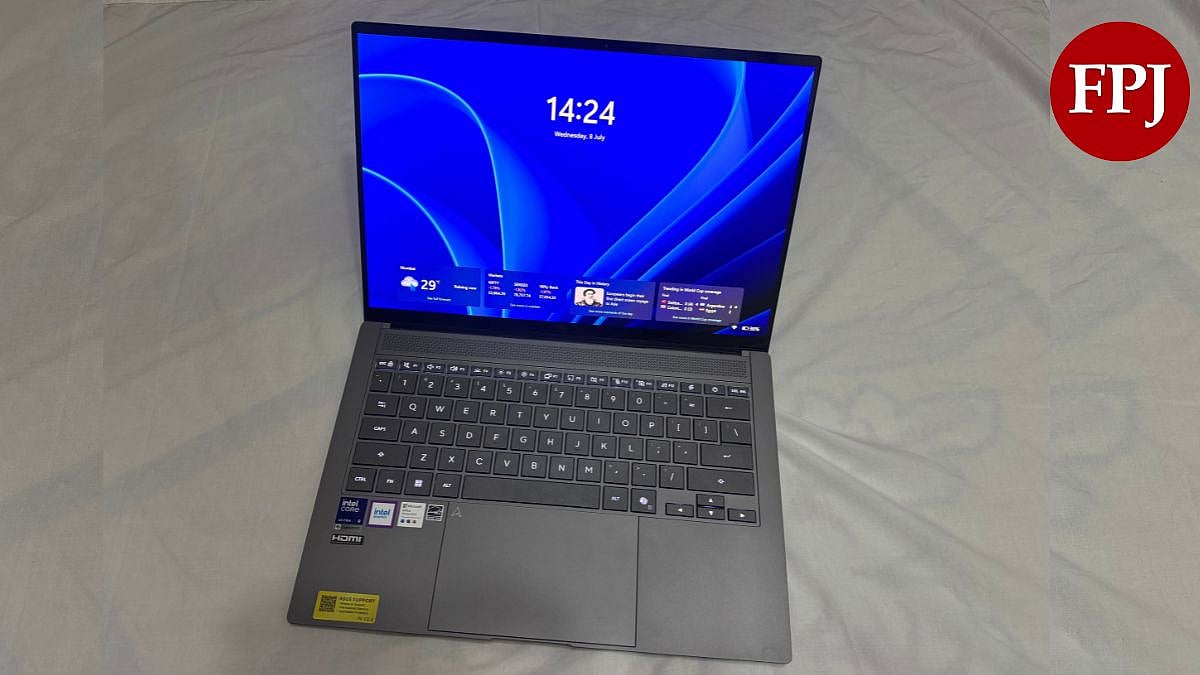
I have used enough thin-and-light laptops to know that thinness usually comes at a cost. Either the thermals suffer, or the ports disappear, or the battery gives up by lunchtime. The Asus Zenbook S14 UX5406AA, priced upwards of Rs. 2 lakh in India, is set out to prove that a 1.1-centimetre chassis does not have to mean compromise.
I have spent the last week using the Asus Zenbook S14 UX5406AA as my primary machine, running it through everyday work, video calls, media, and the occasional stress test. Here is what a week of actual use told me.
Asus Zenbook S14 UX5406AA Review: Display
On paper, the 14-inch 3K OLED panel promises a lot. In use, it delivers on most of it. Colours are rich without tipping into oversaturation, blacks go properly deep, and the 120Hz refresh rate makes scrolling and window switching feel noticeably smoother than on a 60Hz panel. I spent a few evenings watching video content on this screen, and the HDR handling stood out, especially in darker scenes where cheaper OLED panels tend to crush detail.
Where the display genuinely impressed me was consistency. I left the laptop idle for stretches during the week to see how the burn-in protections behave, and the screensaver kicked in reliably. I cannot speak to long-term burn-in risk after a week, but the eye care features are not just paper claims. After several hours of continuous use, my eyes did not feel as strained as they usually do on a standard LCD panel at similar brightness.
Asus Zenbook S14 UX5406AA Review: Design and build
This is the part of the laptop that took me by surprise the most. Photos and spec sheets do not communicate what the Ceraluminum finish actually feels like in the hand. It has a dry, slightly grippy matte texture that genuinely does not resemble standard anodised aluminium. A week of daily handling, including tossing it into a bag most mornings, left no visible marks or fingerprint smudges, which is more than I can say for most metal-bodied laptops I have tested.
The thinness is also more noticeable in daily use than I expected. At 1.2 kgs, carrying this around all day did not add the fatigue that heavier ultrabooks tend to cause by the end of a long day out. I did not get a chance to put the MIL-STD-810H certification through a formal shock or drop test, but the chassis never once felt like it was flexing under normal use, even when I picked it up one-handed by a corner, which is usually where cheaper thin laptops start creaking. Inside the box, you get a charger, a laptop sleeve, and an information leaflet.
Asus Zenbook S14 UX5406AA Review: Performance
Asus Zenbook S14 is powered by the Intel Core Ultra 9 Series 3 processor, with up to 32 GB of onboard LPDDR5X-8533 memory, and a 1 TB SSD. Real-world performance across a week of browser-heavy multitasking, document work, and light editing was smooth throughout. I did not run into any noticeable stutter or lag, even with a dozen-plus browser tabs open alongside other applications.
Fan behaviour is where this laptop earns real credit. I spent most of the week in Standard mode, which struck the best balance between output and noise for regular work. Performance mode is available for heavier tasks, but the fan noise becomes noticeably more present at that setting, so I only switched to it when running back-to-back benchmarks or heavier exports. Thermally, the laptop never got uncomfortably hot on my lap, even during sustained sessions, which is a genuine achievement for a chassis this thin. Casual gaming at low to medium settings is doable, but this is not a machine built for anything graphically demanding, since it runs on integrated graphics alone.
Asus Zenbook S14 UX5406AA Review: Battery life
Asus rates the 77Wh battery at up to 27 hours, and I want to be upfront that I did not come close to that in mixed daily use. Across a week of web browsing, document editing, video calls, and streaming, I consistently landed somewhere between 14 and 18 hours depending on brightness and workload. That is still comfortably more than a full workday, and on a long-haul flight, this easily gets you there without needing to search for a socket.
Charging is quick and convenient. The bundled 68W adapter took the battery from empty to roughly 60 percent in under an hour during my testing, which matches Asus's claim closely. I also used the Battery Health Charging feature through most of the week, capping charge at 80 percent for daily use, and it is a genuinely useful inclusion for anyone planning to hold onto this laptop for the long term rather than replacing it in two years.
Asus Zenbook S14 UX5406AA Review: Software
MyASUS ended up being a bigger part of my daily routine than I expected. I used it regularly to switch fan profiles depending on what I was doing, and the toggle is quick enough that it did not feel like a chore. ScreenXpert's App Navigator was genuinely useful on the couple of days I connected an external monitor, letting me shift windows across displays without the usual drag-and-drop fumbling.
Copilot Plus features, including Live Captions and Windows Studio Effects, worked as expected during video calls, and running these locally on the NPU meant no noticeable lag or added latency. The Two-Way AI Noise Cancellation feature was one of the more practical inclusions I tested this week. Switching to Single Presenter mode during a call taken from a noisy space cut out background chatter effectively, without making my voice sound processed or artificial.
Asus Zenbook S14 UX5406AA Review: Hardware
The webcam and IR camera worked well for the most part. Windows Hello face login was fast on most attempts, though I did have a couple of instances where it failed to recognise my face in low light and fell back to a password, which is worth flagging for anyone who relies on it heavily. Video call quality through the FHD camera was clean and detailed enough for daily meetings.
The touchpad has been comfortable through a week of heavy use. Clicks feel precise, multi-touch gestures registered reliably, and I did not notice any of the accidental input issues that plague touchpads with poor palm rejection. The keyboard took a short adjustment period, since the shorter key travel compared to some other ultrabooks takes a day or two to get used to, but once I settled in, typing for extended stretches did not cause the fatigue I sometimes get on shallower keyboards.
Audio is where my experience left me with mixed feelings. On movies and music with a fuller sound profile, the four-speaker Harman Kardon-tuned setup with Dolby Atmos support does deliver a wider soundstage than I expected from a chassis this thin. But pushed to higher volumes, I did notice some thinness in the bass and a touch of distortion creeping in, which keeps this from being a standout in the audio department despite the branding behind it. It is good enough for calls and casual media consumption, but audio enthusiasts should not expect it to be a headline feature.
Port selection held up well through the week. I connected an external monitor via HDMI and charged simultaneously through one of the Thunderbolt 4 ports without any issues, and did not once need to reach for a dongle across the entire testing period. The laptop offers two Thunderbolt 4 Type-C ports, a standard HDMI 2.1 port, a USB 3.2 Gen 2 Type-A port, and a 3.5 mm combo audio jack.
Asus Zenbook S14 UX5406AA Review: Verdict
A week of actual use largely backs up what the spec sheet promises, with a few real-world caveats worth knowing before you spend upwards of Rs 2 lakh on this laptop. The display is genuinely excellent day to day, the Ceraluminum build feels every bit as premium in hand as it looks in photos, and thermal management is one of the most impressive aspects of this machine given how thin it is. Battery life, while short of the claimed 27 hours, is still strong enough to comfortably cover a full workday and then some.
Where I would pump the brakes a little is on audio, which does not quite live up to the premium billing at higher volumes, and on the occasional inconsistency with face login in low light. Neither is a dealbreaker, but at this price, buyers should walk in with realistic expectations rather than the marketing numbers alone. If your priority is a thin, well-built machine with an excellent screen and dependable everyday performance, this laptop delivers convincingly after a week of real use. If you need discrete graphics or reference-level audio, look elsewhere.
ASUS Zenbook S14 (UX5406AA) Rating: 4/5
Pros
- Ceraluminum chassis feels genuinely premium in hand and resists fingerprints and scratches well
- Lumina OLED display is bright, colour accurate, and excellent for both work and media consumption
- Real-world battery life comfortably covers a full workday, with fast 68W charging
- Full port selection including two Thunderbolt 4 ports, USB-A, and HDMI, no dongles needed
Cons
- No discrete GPU, so graphics-heavy or creative rendering workloads are out of scope
- Real-world battery life falls well short of the claimed 27-hour rating
- Audio distorts slightly and lacks bass depth at higher volumes despite Harman Kardon tuning
- Windows Hello face login is occasionally inconsistent in low light
RECENT STORIES
-
-
-
-
-