SSC CHSL 2026 Tier 2 Objection Window Opens At ssc.gov.in; Challenge Answer Key Till April 23
SSC has released the CHSL Tier 2 Answer Key 2026 and response sheet on ssc.gov.in. Candidates can check their responses and raise objections online by April 23, 6 pm, by paying ₹50 per question.

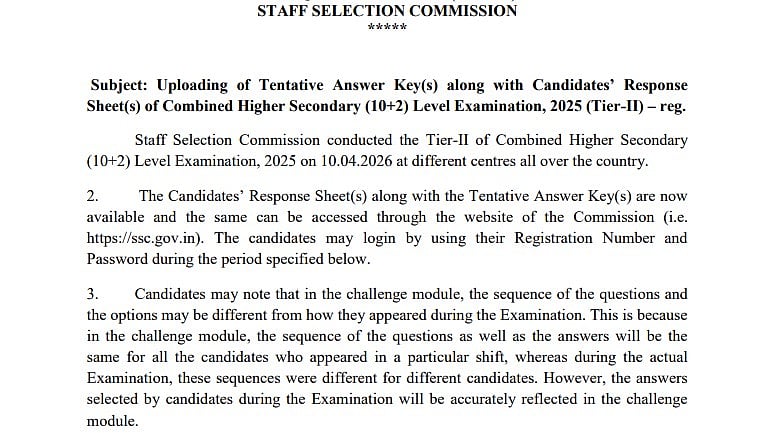
SSC CHSL 2026 Tier 2: The SSC Combined Higher Secondary Level Examination (CHSL 2026) tier 2 answer key and response sheet have been released by the Staff Selection Commission (SSC). Along with that SSC has started the objection window. Candidates can challenge the answer key by submitting on the official website, ssc.gov.in, by April 23 at 6 p.m.
To obtain the SSC CHSL 2026 tier 2 response sheet and answer key, candidates must log in using their credentials.
Direct link to check the official notification
SSC CHSL 2026 Tier 2: Steps to download the answer key
Step 1: Go to ssc.gov.in, the official SSC website.
Step 2: Select the "Login" option and input your password and registration number.
Step 3: As indicated below, click "Answer Key Challenge."
Step 4: You must click on the text that reads "Module for candidate's response sheet, tentative answer keys, and for submission of representation" when a notice appears on your computer.
Step 5: Your Roll Number/User ID and Password, which were obtained during registration, must be entered on the login page that appears on the screen.
Step 6: To continue, click "Submit."
Step 7: The screen displays the SSC CHSL Tier 1 Answer Key 2025.
Step 8: Check the grades by downloading the preliminary answer key.
SSC CHSL 2026 Tier 2: Fees to raise objection
For each contested question or answer, candidates may raise objections by paying a processing charge of Rs 50. The commission will not accept any representations received after April 23 at 6 p.m.
SSC CHSL 2026 Tier 2: Steps to raise the answer key
The SSC CHLS tier 2 answer key 2026 can be challenged in the following ways:
Step 1: Go to ssc.gov.in, the official website.
Step 2: Enter your login information after clicking the login link.
Step 3: The answer key for SSC CHSL will be shown.
Step 4: Click on the response you wish to object to after consulting the answer key.
Step 5: Add the supporting files.
Step 6: Pay the charge.
Step 7: Your objection will be filed when you click submit.
SSC CHSL 2026 Tier 2: Marking system
According to the SSC CHSL tier 2 marking system, each wrong response will result in the deduction of one mark. On April 10, several locations around the nation hosted the SSC CHSL 2026 tier 2 exam.
RECENT STORIES
-
-
-
-
-