Punjab PSEB Class 10 Supplementary 2026 Result Declared At pseb.ac.in; Direct Link Here
PSEB Class 10 Supplementary Result 2026 has been released for students who appeared for the July matriculation supplementary exams. Candidates can check their results online at pseb.ac.in or via SMS using their roll number.

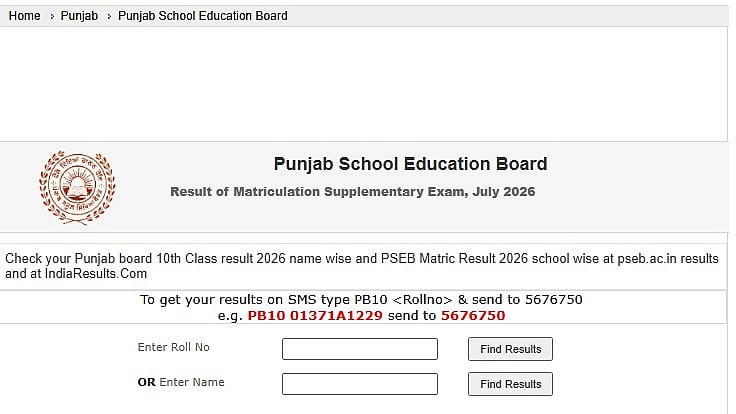
Punjab PSEB Class 10 Supplementary 2026: For students who took the July matriculation supplemental tests, the Punjab School Education Board (PSEB) has released the results of the Class 10 supplementary examination 2026. Candidates can now verify their qualifying status online by clicking on the result link on the board's official website, pseb.ac.in.
Students who were unable to pass the standard Class 10 board test or who qualified to improve their academic standing had another chance thanks to the supplemental exam. Using their roll number and additional exam information, candidates can view their results. A tentative marksheet will be created from the online result.
Direct link to check the result
Punjab PSEB Class 10 Supplementary 2026: Steps to check the result online
Students can check their Punjab Board Class 10 supply result by following these easy steps:
Step 1: Visit pseb.ac.in, the PSEB's official website.
Step 2: Go to the homepage's Results section.
Step 3: Select the "Result of Matriculation Supplementary Examination, July 2026" link.
Step 4: Type in the necessary information, such as the roll number.
Step 5: Send in the information.
Step 6: The screen will display the PSEB Class 10 supplemental result.
Step 7: Download the outcome and print it off for your records.
Direct link to check the result
Punjab PSEB Class 10 Supplementary 2026: Steps to check the result via SMS
Step 1: Open the SMS application on your mobile phone.
Step 2: Type PB10 followed by your roll number.
Step 3: Send the SMS to 5676750.
Step 4: The PSEB Class 10 supplementary result will be sent to the registered mobile number via SMS.
Students can check their result details in the SMS. This facility can be useful when heavy traffic on the official website makes it difficult to access the result online.
Punjab PSEB Class 10 Supplementary 2026: Details mentioned on result
Name: Check whether the name is correctly mentioned.
Roll Number: Verify the roll number printed on the scorecard.
Subject-wise Grades: Carefully check the grades obtained in each subject.
Qualifying Status: Confirm whether the result shows the candidate as qualified.
Original Marksheet: The original marksheet will be distributed by the respective schools at a later date.
RECENT STORIES
-
-
-
-
-